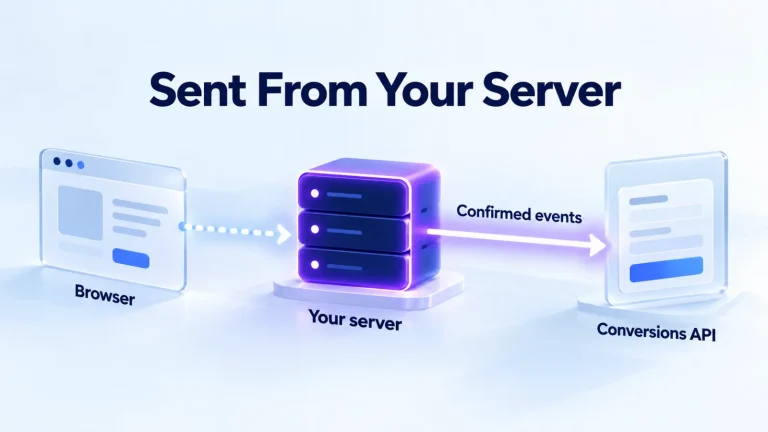
The Conversions API sends conversions from your server to OpenAI instead of from a visitor’s browser. OpenAI calls it a more reliable tracking source than the Pixel alone and recommends it where possible. This guide covers the full implementation. It starts with keys and the request, then the click reference you have to capture yourself. After that come hashed customer data, deduplication with the Pixel, testing and the limits that catch people out.
For the overview of Pixel, UTMs and GA4, start with our conversion tracking guide.
The short version
| Topic | How it works |
|---|---|
| Endpoint | POST https://bzr.openai.com/v1/events?pid= followed by your Pixel ID. |
| Key | A Conversions API key, sent as a bearer token. It’s separate from the Advertiser API key used for setup and campaigns. |
| Batches | Up to 1,000 events per request. If one event fails, the whole batch fails. |
| Timing | Event time in Unix milliseconds, within the last 7 days and no more than 10 minutes in the future. |
| Money | Whole numbers in the currency’s minor unit: 8900 for $89.00. |
| Click reference | The API doesn’t capture oppref for you. Capture it and pass it unchanged. |
| Duplicates | Matched on Pixel ID, event name and event ID. The first event received wins. |
Before you start
| You need | Why |
|---|---|
| A Pixel ID | Every integration needs a data source, even if you never install the browser Pixel. If you also use the Pixel on the same site, reuse its data source. |
| A Conversions API key | It comes from the conversions tab in Ads Manager, for the same ad account. |
| A server to send from | Keep both keys on your server. OpenAI says to send events from your server only, never from page code. The browser side is the Pixel’s job. |
| A conversion event setting | One for each action you’ll measure, attached to your campaigns. Sending events and defining what counts are separate steps. |
Step 1: capture the click reference
When someone clicks a ChatGPT ad, the landing page URL carries an oppref value, an opaque attribution identifier. The Pixel stores it for you in a first-party __oppref cookie that lasts 30 days. The Conversions API does nothing of the kind, so your integration has to carry it from the visit to the conversion:
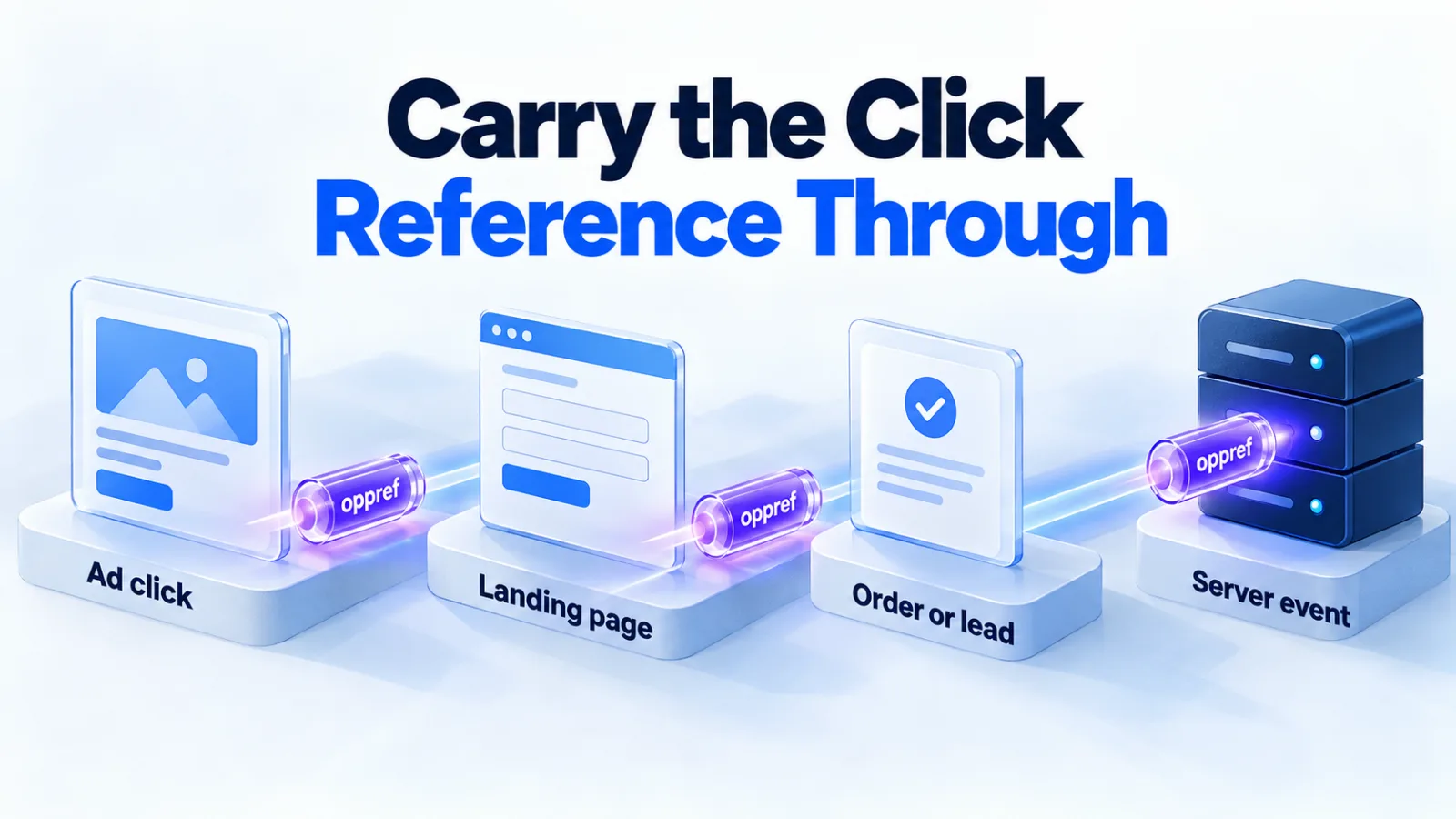
With the Pixel installed, read the __oppref cookie when the order or lead is created, and store it with the record. Without the Pixel, read the oppref parameter from the landing page URL yourself. Keep it with the visitor’s session until they convert. Either way, send the original string without changing it, as the event-level oppref field.
If you run the Pixel too, also pass the __obref cookie, a random browser reference the Pixel creates, as user.obref. OpenAI asks you to follow your site’s consent rules before collecting or forwarding it, and to stop if a visitor withdraws consent.
Step 2: build the event
| Field | What to send |
|---|---|
id | Required. A unique ID for the action, such as the order number. Reuse it on retries and in the Pixel’s event_id. |
type | Required. A standard event such as order_created, lead_created or subscription_created, or custom. |
custom_event_name | Required for custom events: 1 to 64 letters, digits, underscores or hyphens, not a standard event name. |
timestamp_ms | Required. When the action happened, in Unix milliseconds. |
action_source | Where it happened: web, mobile_app, offline, physical_store, phone_call, email or other. |
source_url | Required for web events: the page where the action happened. |
oppref | The click reference from step 1, when you have it. |
user | Optional matching data, hashed where required. See step 3. |
data | Required. The event’s data shape, such as contents for purchases, with amount, currency and items. |
A minimal purchase event, adapted from OpenAI’s own example:
POST https://bzr.openai.com/v1/events?pid=YOUR_PIXEL_ID
Authorization: Bearer YOUR_CONVERSIONS_API_KEY
Content-Type: application/json

{
  "events": [
    {
      "id": "order_12345",
      "type": "order_created",
      "timestamp_ms": 1790467200000,
      "action_source": "web",
      "source_url": "https://shop.example.com/checkout/confirmation",
      "oppref": "VALUE_CAPTURED_FROM_THE_CLICK",
      "data": {
        "type": "contents",
        "amount": 8900,
        "currency": "USD"
      }
    }
  ]
}
Each event type needs a matching data shape in data.type.
| Data shape | Used for |
|---|---|
contents | page_viewed, contents_viewed, items_added, checkout_started and order_created |
customer_action | lead_created, appointment_scheduled, registration_completed and the app events |
plan_enrollment | trial_started and subscription_created |
custom | Custom events |
Step 3: add customer data for matching
A user object inside each event helps OpenAI match conversions, especially when there’s no click reference. Every field is optional. Identifiers must be normalized, then hashed with SHA-256 and sent as lowercase 64-character hex:
| Identifier | Normalize before hashing |
|---|---|
| Trim spaces and lowercase. | |
| Phone | Keep the country code; remove spaces, brackets, dots, hyphens, a leading + and leading zeros. +1 (415) 555-2671 becomes 14155552671. |
| External ID | Trim spaces; keep case and everything else. |
| First and last name | Lowercase and remove spaces and ASCII punctuation; keep accents. O’Connor becomes oconnor. |
| Location | Don’t hash. Send country codes, regions, cities and postal codes as plain text. |
| Device | Don’t hash. IP address, user agent and, for Android, the advertising ID. Apple’s IDFA isn’t supported. |
Never send raw emails, phone numbers or names. OpenAI says it doesn’t currently use Conversions API data for user-level personalization. Each event’s opt_out field lets you opt it out if that changes.
Step 4: deduplicate with the Pixel
Many sites should run both: the Pixel for what happens in the browser, the API for what your server confirms. To stop a purchase counting twice, send it through both with the same Pixel ID and the same event name. Use the same ID too: the Pixel’s event_id and the API’s id. Custom events also need the same custom_event_name. OpenAI keeps the first event it receives and ignores later duplicates.
Step 5: test before real traffic
- Validate. Add
"validate_only": trueat the top of the request. OpenAI checks the events without saving them, and they don’t show up in monitoring. - Send a real test event, and check the recent-events endpoint, which returns a sample from roughly the last 15 minutes. Server events show the channel
server_to_server; Pixel events showpixel_sdk. - Check the campaign link. The event you send must match the conversion event setting on the campaign, and custom event names must match exactly. Events from a mismatched setup don’t backfill.
- Wait for reporting. Attributed conversions take 24 to 48 hours to appear in Ads Manager.
Limits that catch people out
The 7-day window
Events older than 7 days are rejected. Our view: a deal that closes weeks after the click can’t be sent as a conversion. Optimize for an earlier step, such as a lead or booked call, and judge revenue in your CRM.
All-or-nothing batches
One bad event fails the whole batch of up to 1,000. We’d validate events before batching, and log the failed batch so it can be fixed and resent with the same IDs.
Retries
Reuse the same event ID when you retry, so a resent event isn’t counted twice. For temporary failures, OpenAI advises bounded retries with increasing delays.
Two hosts, two keys
Events go to bzr.openai.com with the Conversions API key. Setup and campaigns go to api.ads.openai.com with the Advertiser API key. Mixing them up is a common authentication failure.
Apps
There’s no native mobile SDK. Send app_installed and app_opened from your server with action_source set to mobile_app. Or use one of OpenAI’s mobile measurement partners, which OpenAI lists as Adjust, Airbridge, AppsFlyer, Branch, Kochava, Singular and Tenjin.
When a request fails
OpenAI’s troubleshooting guide gives a first check for each kind of API error. Match the status to the cause before you retry.
| Problem | What to inspect |
|---|---|
| Authentication failure | The key type and the bearer header |
| Access denied | The account ID, key access and feature availability |
| Validation error | Required fields, allowed values, amounts, parent IDs and incompatible settings |
| Conflict | Reuse of an idempotency key with a different body |
| Request too large | The endpoint’s size or operation-count limit |
| Rate limited | The retry guidance and the shared limits |
Correct validation failures before you resend. For a temporary failure, wait and retry with the original ID. Conversion events use a separate host and key from the management API, so check which one a failing request used.
Offline, phone and store conversions
The action_source field accepts offline, physical_store, phone_call and email. So the API can report actions that never touch your website, such as a lead taken by phone. There’s no separate phone-call event type: you’d send, for example, lead_created with action_source set to phone_call. OpenAI can credit these conversions to an ad only if it can match them. Matching uses the click reference or the customer data you include. The 7-day limit applies too.
If you send events for several advertisers, as a platform or measurement partner, add a stable integration_source value. Put it on every request, to identify your integration.
Related guides
The Conversions API is one part of a tracking setup. These guides cover the rest.
| For | Read |
|---|---|
| The Pixel, UTMs and GA4 | Conversion tracking |
| Visits filed as Direct | Ad clicks showing as Direct |
| Choosing what to optimize | Bidding strategies |
| Running a first test | A 30-day test plan |
For a full setup, our tracking and measurement service builds and tests it. Before launch, send one real event of each type. Record the event ID you used, so you can find it in monitoring later.
Questions
Do I still need the Pixel if I use the Conversions API?
Not necessarily. A server-only setup still needs a Pixel ID, but not the browser Pixel. Running both, with shared event IDs, gives you browser events plus confirmed server events. The Pixel also captures the click reference for you.
Can I send events without the oppref value?
Yes, but OpenAI says passing it supports click matching. Without it, matching relies on the customer data you include, such as hashed emails. Send as much accurate matching data as you’re permitted to, and never invent identifiers to improve a score.
Can I upload conversions from last month?
No. Event timestamps must be within the last 7 days, and no more than 10 minutes in the future. If your sales cycle is longer, send an earlier event, such as a qualified lead, and keep revenue reporting in your CRM.
How do I send a refund or a cancelled order?
OpenAI’s documentation doesn’t describe a refund event, and we haven’t found a way to reverse a conversion that was already sent. Send an order only once the payment is confirmed, so the cases that need reversing are rare. Keep refunds in your own records, and reconcile against Ads Manager when you review results.
Is there a limit on how often I can send events?
OpenAI’s troubleshooting guide lists rate limiting. It says to follow the retry guidance the service returns, with bounded retries and increasing delays. It doesn’t give a fixed number in the pages we read. So build in backoff from the start, and batch events within the 1,000 limit.
Are view-through conversions sent differently?
No. The same events support click-through and view-through reporting, with no extra field. OpenAI’s developer docs say view-throughs are reported separately from the Conversions total. Its Help Center says the total includes them when the one-day view window is on. Check which column you’re reading.
Want it built and tested for you? See our tracking and measurement service.